

A business owner opens their analytics report, sees a few visits from an AI assistant, and asks the obvious question: are these visitors becoming customers? The answer needs more than a screenshot of a rising traffic line. It needs a reliable way to connect the source, the page someone arrived on, and the action they eventually took.
AI referral tracking is particularly useful for service businesses and online stores investing in detailed guides, comparison pages, and product information. Those pages may be discovered through several interfaces, but each visit still needs a website that answers the next question clearly. This guide explains how to investigate that journey in GA4 without confusing clicks with citations, mixing reporting scopes, or claiming to measure activity your website cannot see.
Reviewed on 28 October 2026. Analytics interfaces and channel definitions can change; confirm the dimensions available in your property before changing a live reporting setup.
Start with the question your business needs answered
“Show me AI traffic” is a starting point, not a useful reporting brief. Decide what decision the report should support. A consultant might want to know whether a comparison guide brings qualified discovery calls. A retailer might want to understand which product pages receive useful visits. An agency might want to compare educational articles with service pages.
Write one question, such as: “Which landing pages bring AI-assistant sessions that complete a valid enquiry?” This keeps the work focused. It also helps identify missing measurement. If the website records a button click but never confirms a successful enquiry, an acquisition report cannot repair that gap.
Choose an owner for the report and an owner for the website action being measured. They may be the same person in a small business, but both responsibilities should be explicit. One person checks the numbers; the other confirms that the event still represents something valuable.
Use the current AI Assistant channel before building a workaround
Google's current default channel documentation includes an AI Assistant channel. Its definition covers recognised assistant sources and explicitly separates them from Google's AI Overviews and AI Mode, which are included under Organic Search. This distinction matters when someone asks for “all AI traffic.” A single channel does not represent every AI-related search experience.
Start by inspecting your property's acquisition reporting and available channel dimensions. Do not automatically install a custom referral rule copied from an older tutorial. First establish whether the built-in classification already answers your question. If you maintain a custom group, document why it exists and compare it with the default group before relying on it.
Keep a dated note of the definition used in your reporting. A change in classification can alter the way a trend looks without necessarily reflecting a comparable change in customer behaviour. Annotating that change is more useful than treating every movement as evidence that a campaign succeeded.
Keep session, user, and key-event questions separate
The same channel name can appear alongside dimensions with different scopes. Google's documentation distinguishes session acquisition, first-user acquisition, and event-related attribution. For a landing-page investigation, begin with a consistent session-oriented view rather than combining columns simply because they are available.
Think of three separate questions. How did the person first discover the business? What brought them into this particular visit? Which interactions received credit around a key event? These questions can produce different answers without any report being broken.
For example, someone may first read an article through an assistant, return through a saved bookmark, and enquire after receiving a follow-up email. That is an illustrative journey, not a claim about any particular analytics attribution result. It shows why a single last-visit label should not be turned into a complete account of the relationship.
Build a small report you can explain
Create a working view containing a limited set of dimensions and metrics. Start with the session channel, source and medium, landing page, sessions, engaged sessions, and the relevant key event. Add country or device only when it helps answer a defined question. Avoid producing a dashboard with so many breakdowns that every row becomes too small to interpret.
Use a stable date range and record when the report was created. Compare similar periods where possible. A holiday promotion, a new article, or an unusual referral can make two adjacent weeks very different. Keep a short context note next to the numbers so another team member can understand the comparison later.
If the property has little traffic, treat the report as a diagnostic tool. A handful of sessions can identify a broken page or an unexpected source. It cannot establish a dependable conversion benchmark for an entire marketing channel.
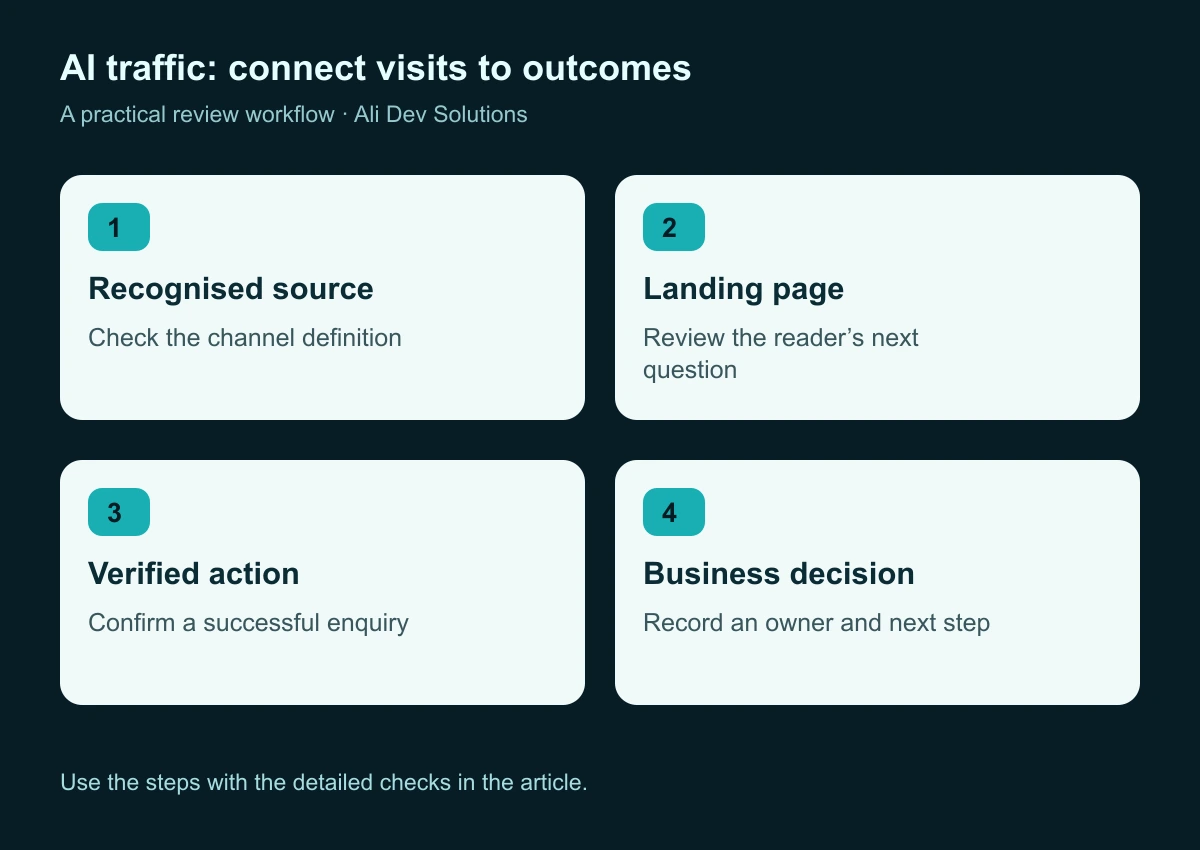
Use this workflow to keep acquisition reporting connected to a real website outcome.
Inspect the landing page before judging the source
A visitor's arrival page often explains more than the assistant's name. Open the pages receiving those sessions and read them as a first-time visitor would. Is the main answer visible? Does the page explain who the service is for? Can someone find evidence, pricing context, delivery information, or an appropriate next step without starting again from the homepage?
Look for a mismatch between the page's promise and its action. An educational guide should not abruptly demand a sales call before delivering the promised explanation. Equally, a useful article should not leave interested readers without a relevant route to the service behind it.
For a service website, add contextual links to a suitable service or case study. For a store, connect comparison content to the exact collection or product being discussed. Our internal-linking guide explains how to make those connections part of the reader's journey rather than a block of unrelated links.
Measure a successful enquiry, not merely an attempted one
Before interpreting key-event rates, test the underlying action. Submit an authorised test enquiry using clearly marked test details, confirm that the website returns success, and check that the enquiry reaches the intended destination. A click on “Send” can occur even when validation fails or an email service rejects the request.
Separate meaningful stages where that distinction helps. A form start, an attempted submission, and a confirmed submission describe different behaviour. Keep event names understandable and maintain a brief event dictionary describing the trigger, the responsible page, and the business meaning.
Do not put the visitor's message, email address, or other personal form content into an analytics event as a shortcut for qualification. Keep the measurement layer focused on the action. Review lead quality in an appropriate business system, with a controlled process for connecting aggregate reporting to operational decisions.
The GA4 lead-tracking guide covers the wider measurement setup. For delivery problems, use the separate contact-form reliability workflow before assuming a traffic channel is underperforming.
Treat missing referral information as uncertainty
Some journeys do not preserve a useful referring source. Google's explanation of direct traffic describes Direct as traffic without a clear referral source and discusses several reasons information can be missing. That does not mean every unexplained visit came from an AI assistant.
Avoid estimating AI traffic by taking a proportion of Direct and renaming it. If you need a working hypothesis, label it as a hypothesis and keep it outside the confirmed channel totals. Reports should make uncertainty visible rather than hide it inside an impressive-looking metric.
Likewise, a website visit is not a record of every time the business appeared in an answer. The reporting described here starts when measurable website activity occurs. Do not label a sessions chart “AI mentions” or “assistant impressions” unless you have a separate, clearly defined data source for those measures.
Use controlled tests to check the reporting chain
A useful test is narrow, repeatable, and documented. Choose one landing page, note the date and device, open a legitimate link from the source you are investigating, and inspect whether the website measurement behaves as expected. Do not flood assistants with artificial queries or generate repeated visits to inflate the report.
Check the basics first: the destination loads, redirects behave as intended, the measurement code is present where appropriate, and the important action works. If the visit is not visible in the expected reporting view, record what you observed before changing settings.
Keep test sessions separate from commercial interpretation. Your own test may confirm that an event is being recorded, but it does not demonstrate genuine buyer demand. A clean test log prevents troubleshooting activity from becoming an accidental success story in a client presentation.
Compare lead quality without inventing precision
Suppose an illustrative consultancy receives a small number of assistant-referred sessions and one enquiry. That enquiry might be excellent, irrelevant, or spam. A report showing a high rate from a tiny sample does not settle the question.
Agree on a simple definition of a qualified enquiry before reviewing sources. It might involve service fit, a real business problem, and a workable delivery scope. Use the same definition across channels. If qualification depends on changing individual judgement, document that limitation instead of presenting the resulting percentages as exact science.
Look at patterns over time: which pages repeatedly attract useful enquiries, which questions prospects mention, and which topics require substantial clarification. Qualitative feedback can suggest a content improvement even when the analytics sample is too small for a confident channel comparison.
Keep campaign tagging separate from editorial discovery
Use a consistent tagging convention for marketing links you control. An email promoting a guide is a different activity from someone independently finding the guide through an assistant. Renaming both journeys “AI” makes the report less useful.
Create a small naming document with examples approved by the team. Include the intended source, medium, campaign name, owner, and destination. Test a representative link through any redirects before distributing it. Do not add campaign parameters to internal navigation links simply to track movement between pages; use appropriate navigation measurement instead.
Our UTM campaign guide provides a broader naming workflow. The aim is not to create more tags. It is to keep externally promoted campaigns distinguishable from the discovery activity you are trying to understand.
Turn the report into a monthly improvement routine
A monthly review should end with a short list of actions. For each priority page, record the question the reader is trying to answer, the next action currently offered, the observed problem, and the change you will test. Assign an owner and review date.
Useful changes might include a clearer comparison table, a better product specification, an explanation of service scope, or a more relevant case-study link. These improvements help readers regardless of whether they arrive through an assistant, search engine, email, or direct visit.
Avoid rewriting every page after one unusual week. Make a focused change, allow enough time to observe real use, and keep the previous version available. If several major changes occur together, be honest that the report cannot isolate the effect of each one.
Questions to answer before investing in another dashboard
Can GA4 tell us every prompt that led to a visit? Do not build a reporting promise around that assumption. Begin with the actual dimensions and values available in the property. If a separate tool claims prompt visibility, review its method and limitations before combining its estimates with measured website sessions.
Should we create a custom AI channel immediately? Check the current built-in channel first. A custom definition is useful only when it answers an additional question and is maintained carefully. Preserve the distinction between the standard report and your own interpretation.
Does more assistant traffic prove our SEO is improving? It is one observation. Assess the page, the audience, the resulting actions, and the wider search performance together. A traffic increase without useful outcomes may point to a mismatch rather than a success.
What if the numbers are very small? Use them to find problems and generate questions. Combine them with direct customer feedback, but avoid making large budget decisions from a handful of visits.
A practical first-week plan
On the first day, confirm that the website's important action is measured correctly. Next, inspect the default channel dimensions and create a small acquisition view. Review the leading landing pages, then run a controlled test and document the result. Finish the week by agreeing on one page improvement and a sensible review schedule.
Keep the deliverable simple: a report definition, an event dictionary, a test note, and an improvement backlog. Those four items are more valuable than a complicated dashboard nobody can explain. They let the team repeat the process and challenge the interpretation when the evidence changes.
Ali Dev Solutions can help connect SEO and content strategy with a clearer website enquiry journey. Tell us about your website if you need a practical measurement review rather than another collection of unexplained charts.