

A shopper follows a link to a blue jacket in their size, but the website opens a different colour, shows the wrong image, and adds another size to the cart. The page may contain plenty of product keywords, yet the experience still fails at the point where the details matter most.
Product-variant SEO starts with that relationship between a product family and its individual options. Search engines, shopping systems, and customers need a consistent explanation of what is being sold. Structured data can describe the relationship, but it cannot make an inaccurate catalogue trustworthy. This guide explains how to plan the data, URLs, interface, and checks together before adding more markup to a Shopify or other ecommerce website.
Understand the product family before choosing schema
Begin with a clear product model. A product family represents the shared item: for example, an illustrative everyday jacket. Its variants represent the purchasable combinations, such as navy in medium or green in large. Accessories, multipacks, personalised products, and unrelated designs may need different treatment. Do not group products simply because they look similar in a spreadsheet.
Ask the merchandising team which information is shared and which changes by option. A shared description might explain the jacket's intended use. A variant might have its own image, identifier, stock position, and offer. The model should reflect how the customer chooses and how the business fulfils the order.
Write these decisions down before development starts. If the catalogue team, theme developer, and marketing team use different meanings for “product,” the disagreement will eventually appear in URLs, feeds, analytics, or customer support.
What ProductGroup adds to the explanation
Google's product-variant documentation describes ProductGroup and properties including variesBy, hasVariant, and productGroupID. These identify a family and its relationship to individual Product entities. The documentation covers both single-page and multi-page approaches.
Treat this as a description of the catalogue, not an additional keyword field. The important question is whether the relationship is correct and useful. A well-named group with inconsistent variants is still an unreliable implementation.
Avoid adding a separate schema generator before checking what the platform and theme already output. Two independently maintained systems can describe the same product differently. Assign one owner to the final structured-data implementation and document which source supplies each value.
Create a variant data worksheet
A simple worksheet makes a technical discussion much easier. Include the parent name, group identifier, variant identifier, distinguishing attributes, destination URL, image, price source, availability source, and owner. Add a column for the date last checked.
For an illustrative jacket catalogue, each row might represent one colour-and-size combination. The worksheet is not a second inventory system. Its purpose is to reveal missing connections and make the implementation reviewable. Link to the operational source instead of manually maintaining another competing stock count.
Check naming consistency. “Midnight,” “navy,” and “dark blue” may describe the same colour internally, but the website should not switch between them unpredictably. Similarly, size labels should match the selection controls, product information, and fulfilment records.
Decide how a visitor reaches a selected variant
A variant URL should take the customer somewhere meaningful. Open the link in a fresh browser session and confirm that the intended option is selected. The main image, displayed information, and cart action should agree with that selection.
Google's variant guidance asks for a distinct URL that can preselect each variant. It also distinguishes the canonical treatment of a single-page product group from a multi-page arrangement. Use that guidance with the actual storefront architecture rather than assuming every colour must become a separate search landing page.
A query parameter can represent a selected option without automatically becoming a page you want indexed independently. A dedicated page can serve a genuinely distinct product presentation. The choice requires a coherent information architecture, not simply a preference for more URLs.
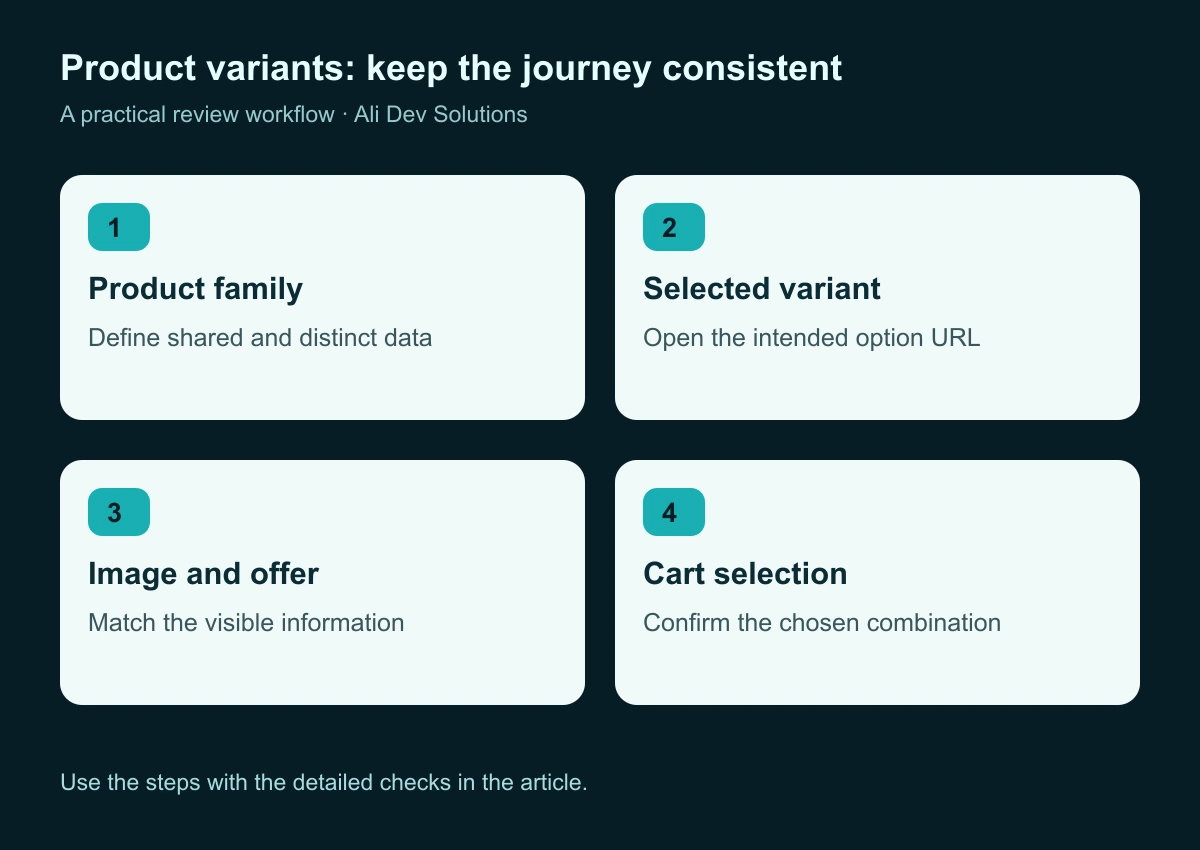
Review the entire variant journey rather than checking the schema in isolation.
Keep canonical decisions consistent with the architecture
Canonical decisions should be made alongside the URL model. If several addresses represent substantially the same product page, decide which address should act as the preferred version and keep the signals consistent. If the store intentionally presents distinct variant pages, review their purpose and content before consolidating them automatically.
Google's canonical guidance explains several methods for indicating preferred URLs. The practical lesson for a catalogue team is to avoid contradictory instructions across page tags, internal links, and the sitemap.
Build a small URL map covering representative products. Include the base address, option-specific links, the canonical shown on each, and the URLs used in important navigation. That map gives developers a concrete test case and makes later theme changes easier to review. Our canonical audit guide covers the broader investigation.
Make the visible product page the source of truth
The information customers can see must agree with the information supplied elsewhere. If an unavailable size is presented as purchasable, correcting an invisible data field is not enough. If the image remains on another colour after selection, the variant experience remains confusing even when an automated validator accepts the page.
Check the page in several states: before selection, after choosing a valid combination, after choosing an unavailable combination, and after returning from the cart. Include a reload and a shared-link test. The interface should not depend on a previous visitor session to make sense.
Google's structured-data policies require markup to represent the page accurately and make clear that eligibility does not guarantee a rich result. Keep that distinction in stakeholder expectations. The deliverable is a reliable implementation, not a promised search appearance.
Design product controls that explain the choice
Use option labels customers understand. Colour swatches should have readable names, and size choices should connect to a useful size guide where one is needed. Make the current selection visible. Do not rely only on a subtle border colour that disappears on a small screen.
When a combination is unavailable, explain what happens next. The customer may be able to choose another option, request a restock notification, or view a suitable alternative. Keep the response specific to the selected variant rather than making the whole product appear unavailable unnecessarily.
Test the controls with a keyboard and on a touch device. Long labels, expanded menus, image galleries, and sticky purchase panels can interfere with one another. Good product data and good interface design are connected parts of the same purchase decision.
Check images at the option level
A clear photograph often communicates the variant faster than a specification table. Plan which images belong to the shared product and which belong to a particular colour, material, finish, or configuration. Record the relationship so a future content editor can maintain it.
Use consistent framing where comparison matters. If one colour is shown in a detailed close-up and another appears as a distant lifestyle photograph, customers may struggle to compare them. Provide additional imagery where it helps explain the product, but keep the primary option image predictable.
Write descriptive alternative text that explains the relevant view naturally. Do not repeat a string of commercial keywords. For the wider workflow, see our website image optimisation guide. Its publishing checks apply to both small product cards and larger detail-page galleries.
Prevent conflicting output from themes and apps
Before implementing changes, inspect what the live page already contains. Make a list of components that may generate product data: the storefront theme, a search optimisation app, a review integration, and any custom code. Identify the intended owner of each part.
Do not remove a working integration simply because another tool reports a warning. Read the warning, reproduce the issue on a representative product, and understand the effect of the proposed fix. A change that removes duplicate markup could also remove useful review or offer information if applied without care.
Make updates in a controlled environment where possible. Save the previous configuration and compare a small sample before expanding. For a Shopify store project, catalogue and theme ownership should be part of the handover, not an undocumented dependency on the last developer.
Use a test matrix rather than one perfect example
The easiest product rarely exposes the weaknesses in a catalogue. Select examples that cover different combinations of options and content. Include a product with one variant, several variants, an unavailable option, changing prices, and a product with unusually long labels.
For each example, record the expected selection, destination address, main image, visible offer, cart contents, and structured-data result. If the store operates in more than one market, add the relevant currency and destination checks. Keep those tests tied to the actual markets the business supports.
A compact matrix makes regression testing repeatable. It also helps separate a catalogue error from a theme error. If one row is wrong in every interface, investigate the source data. If the same source is displayed correctly in one place but not another, investigate the presentation or integration.
Validate the markup and the customer journey separately
An automated structured-data test can identify missing or invalid information. It cannot determine whether the selected product feels clear to a customer or whether the fulfilment team will receive the intended order. Run both kinds of review.
For the technical review, check representative live URLs with Google's testing tools and inspect the resulting entities. Keep a dated record of issues and the changes made. For the customer review, follow the selected variant from a fresh landing through the cart, stopping before an unapproved purchase.
Include a person who did not build the page. Ask them to identify the selected colour, size, and price, then explain what would happen if they changed one option. Their uncertainty can expose a usability problem that is invisible to someone familiar with the implementation.
Plan maintenance around catalogue changes
Variant work is not finished when the first set of pages validates. Products are discontinued, images are replaced, sizes are renamed, and prices change. Define which changes require a fresh check and who performs it.
Useful triggers include a new product family, a theme update, a catalogue import, a new feed integration, or a change to option naming. Keep an example of a known-good product and compare it after those events. Maintain a short issue log rather than relying on memory.
If a variant sells out, choose a customer-facing response consistent with the product's future. A temporary stock issue is different from a permanent replacement. The out-of-stock product guide explains how to investigate that distinction without treating every stock change as a reason to delete a page.
A worked planning example
Imagine a small outdoor retailer with one jacket in three colours and four sizes. This is an illustrative planning exercise. The first task is to confirm the actual purchasable combinations, because not every colour may exist in every size. The team then assigns stable identifiers and checks which images belong to each colour.
Next, they test links that open the intended options, agree on the preferred URL approach, and inspect the page's existing structured data. Only after those decisions do they update the implementation. Finally, they test unavailable combinations and confirm that the cart preserves the selection.
The most useful project output is the combined worksheet and test matrix. It gives the catalogue manager a way to add the next jacket without rebuilding the entire process. It also gives the developer a clear regression checklist for the next storefront update.
Questions merchants commonly ask
Does every variant need a separate indexable page? No single URL strategy suits every catalogue. Use the platform architecture, the distinct value of each page, and the applicable search guidance to make a consistent decision.
Will ProductGroup guarantee enhanced search results? No. Correct structured data supports eligibility and understanding; the search engine decides how results appear.
Can we fix everything with an SEO app? An app may help generate or manage markup, but it cannot reliably settle unclear product relationships or correct misleading visible information on its own.
Should we add more variants just to target more keywords? Variant records should represent real customer choices. Creating artificial combinations makes the catalogue harder to maintain and the shopping experience harder to trust.
Your next implementation milestone
Start with a small representative group of products. Document the relationships, test the selected URLs, align the visible information, and review the generated markup. Expand only after the approach works across the important edge cases.
This work supports the same foundations covered in our product-page SEO guide and Merchant Center readiness guide. If your catalogue, theme, and product feeds disagree, contact Ali Dev Solutions to plan a focused ecommerce review before adding another layer of tools.